
Samsung UA65RU7100K 65-Inch TV Repair and Service Guide
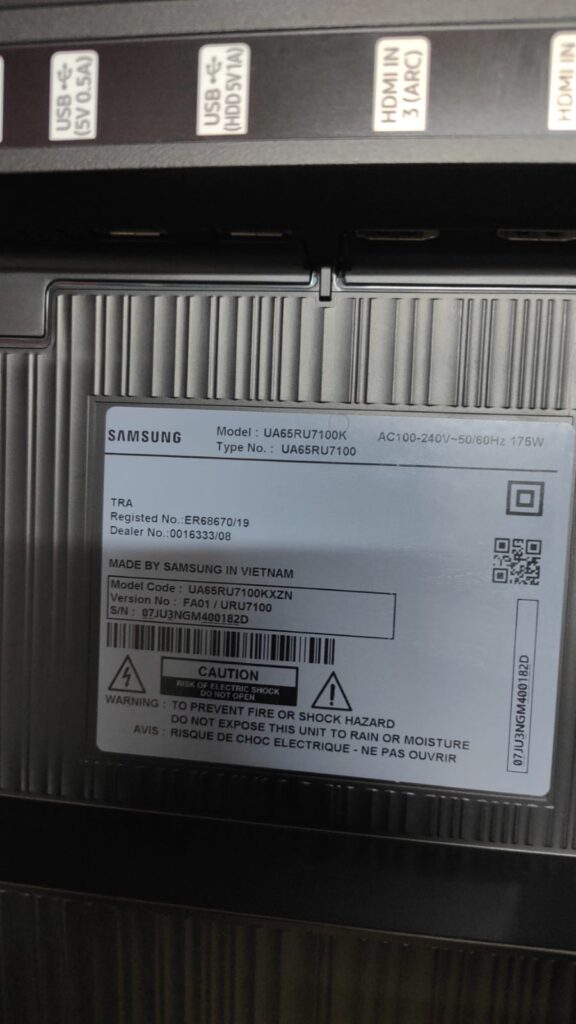
The Samsung UA65RU7100K (call 0723763173)is a 65-inch 4K Smart TV from the Samsung RU7100 series. The model shown in the supplied photograph is identified as UA65RU7100K, with the model code UA65RU7100KXZN and type number UA65RU7100. This television is designed for 4K UHD viewing, Smart TV functions, HDMI connectivity, USB connectivity and home entertainment applications.
When a Samsung UA65RU7100K develops a fault, the correct approach is to identify the exact symptoms and then test the relevant circuit rather than replacing expensive components without diagnosis. A television that has no picture, for example, may have a backlight problem, power problem, mainboard problem, display-control problem or panel-related fault. These faults can produce similar symptoms but require completely different repairs.
This detailed guide covers common Samsung UA65RU7100K repair problems, diagnosis, backlight faults, power failures, mainboard faults, HDMI problems, sound problems, display issues, Smart TV problems and other service requirements.
Samsung UA65RU7100K No Picture Repair
One of the most common complaints with a 65-inch Samsung television is that the TV turns on but does not display an image.
The television may appear to start normally. The standby indicator may respond to the remote control, the television may produce sound, and connected devices may appear to communicate with the TV. However, the screen remains black.
This situation requires proper diagnosis.
A black screen does not automatically mean that the LCD panel is defective. Several other components can cause the same symptom.
Possible causes include:
- Failed LED backlights
- Damaged LED strips
- Backlight driver problems
- Power supply faults
- Mainboard faults
- Display-control circuit problems
- Loose internal connectors
- Damaged panel connections
- Internal power-rail problems
- Component failure on the television boards
The first step is to determine whether the television is actually operating while the display remains dark.
If sound is available, the television responds to the remote control and external devices are recognized, the backlight system becomes one of the important areas to investigate.
If there is no response at all, the technician should investigate the power and mainboard sections.
Samsung UA65RU7100K Sound but No Picture
A Samsung UA65RU7100K that produces sound but has no visible picture requires careful testing.
This symptom is often associated with LED backlight failure, but it should not be assumed immediately.
A technician can investigate whether an image is being generated by the television and whether the backlight system is illuminating the panel.
If the picture information is present but the LEDs are not illuminating, the repair may involve the LED strips or the backlight supply circuit.
If the television is not producing the correct display signal, the mainboard or display-control section may require further testing.
This distinction is important because replacing a backlight when the actual problem is a mainboard fault does not solve the television's problem.
Samsung 65-Inch LED Backlight Replacement
The Samsung UA65RU7100K uses an LED backlight system to illuminate the LCD display.
With age and extended use, individual LEDs can fail. Sometimes a single LED fails while other LEDs remain operational. In other cases, multiple LED strips can develop problems.
Common backlight symptoms include:
- Completely dark screen
- Picture visible only briefly
- Screen that becomes dark after startup
- Uneven illumination
- Bright patches
- Dark areas
- Flickering backlight
- Repeated television shutdown
- Very dim picture
- Sound with no visible image
Backlight replacement on a 65-inch television requires considerable care.
The LCD panel is large and fragile. It must be handled correctly during disassembly because accidental bending, pressure or impact can cause permanent panel damage.
The LED strips should be tested and the correct replacement parts selected according to the exact television configuration.
Samsung UA65RU7100K Black Screen Diagnosis
A black screen can originate from different sections of the television.
A proper diagnostic process normally considers:
Power supply
The technician checks whether the required power rails are available.
Mainboard
The mainboard controls the television's processing, operating system, inputs and communication with other circuits.
Backlight
The LED system must produce the required illumination behind the LCD panel.
Display control
The signal going toward the display must be present and correctly processed.
Panel
The LCD panel itself must be evaluated if other sections appear to be functioning correctly.
This systematic approach helps prevent unnecessary replacement of expensive parts.
Samsung UA65RU7100K Power Problems
Another common repair requirement is a television that refuses to turn on.
A Samsung UA65RU7100K may develop several different power-related symptoms.
The TV may be:
- Completely dead
- Showing no standby indication
- Clicking when switched on
- Turning on and immediately shutting down
- Repeatedly restarting
- Showing standby but refusing to start
- Starting intermittently
- Turning off after several minutes
These symptoms can have different causes.
The power supply board is an important part of the diagnostic process. However, the mainboard and connected circuits must also be considered.
A technician should not simply replace the power board because a television is dead. Measurements and circuit testing can help establish whether the power board is actually responsible.
Samsung UA65RU7100K No Standby Light
When the television has no visible standby indication, the first consideration is whether power is reaching the television correctly.
External power problems should be eliminated first.
The technician may then inspect the internal power section and relevant connections.
Possible causes include:
- Power supply failure
- Internal fuse failure
- Shorted component
- Damaged power circuitry
- Mainboard-related fault
- Connector problems
Internal television power circuits contain hazardous voltages. Proper electrical safety procedures are necessary during diagnosis and repair.
Samsung UA65RU7100K Turns Off Automatically
A Samsung TV that starts normally and then switches off can have several possible causes.
The television may be shutting down because of:
- Power instability
- Backlight problems
- Overheating
- Mainboard faults
- Protection circuits
- Software-related problems
- Internal component failure
If the TV turns off at approximately the same stage during startup, this can provide useful diagnostic information.
If it operates for a long period and then shuts down, thermal or intermittent faults may need to be investigated.
Samsung UA65RU7100K Restarting Problem
Repeated restarting is another issue found in Smart TVs.
The television may show the Samsung logo and then restart. It may continuously cycle between standby and startup.
Possible areas requiring investigation include:
- Mainboard
- Power supply
- Software
- Memory-related circuitry
- Voltage regulation
- Shorted circuits
- Connected peripherals
The correct diagnosis depends on the exact startup behaviour.
Samsung UA65RU7100K Mainboard Repair
The mainboard is one of the most important electronic assemblies inside the television.
It handles many functions, including:
- Video processing
- Audio processing
- Smart TV functions
- HDMI processing
- USB functionality
- Network functions
- Remote-control communication
- System control
- Communication with other boards
A defective mainboard can therefore create a wide range of symptoms.
Possible mainboard symptoms include:
- No startup
- Rebooting
- Frozen screen
- HDMI failure
- USB failure
- No sound
- No picture
- Smart TV problems
- Network problems
- Remote-control response problems
- Logo stuck on screen
- Intermittent operation
Mainboard repair or replacement should be based on diagnosis and board compatibility.
Samsung UA65RU7100K HDMI Repair
The television shown in the photograph has multiple HDMI connections, including an HDMI input marked HDMI IN 3 (ARC).
HDMI is commonly used to connect:
- Decoders
- Gaming consoles
- Soundbars
- Blu-ray players
- Streaming devices
- Computers
- Media players
- Home theatre systems
When an HDMI device is not detected, the problem may be caused by the external device, HDMI cable, television input or internal HDMI circuitry.
A good troubleshooting process starts with testing the external equipment and cable before assuming that the TV's mainboard is defective.
Samsung UA65RU7100K ARC Problems
The HDMI ARC connection is designed to support compatible audio communication between the television and an external audio system.
If a soundbar or home theatre system does not receive audio through ARC, several things should be checked.
These may include:
- HDMI cable
- Correct HDMI port
- Audio settings
- External sound system settings
- ARC compatibility
- Television software
- HDMI circuitry
A fault in the television's HDMI section can also result in ARC communication problems.
Samsung UA65RU7100K USB Problems
The photograph shows USB connections on the television.
USB ports can be used with compatible devices for functions such as media playback and certain supported accessories.
A USB fault may appear as:
- USB device not detected
- Intermittent USB connection
- Media not loading
- USB port not supplying power
- One USB port working while another does not
The USB device and file format should be checked before diagnosing an internal hardware problem.
If multiple compatible devices fail on the same port, the television's USB circuitry may require further inspection.
Samsung UA65RU7100K Screen Lines
Lines on a television display can be caused by several different issues.
The screen may develop:
- Vertical lines
- Horizontal lines
- Multiple lines
- A single permanent line
- Flickering lines
- Coloured lines
- Half-screen lines
- Lines that appear after the TV warms up
Display faults can involve the panel, display connections, control circuitry or related components.
A technician should inspect the symptom carefully.
A line that remains permanently in exactly the same position can indicate a panel-related problem. Other types of display abnormalities can originate from control circuitry or connections.
Samsung UA65RU7100K Half Screen Display
A television showing only half of the picture requires careful examination.
Possible symptoms include:
- Left half working
- Right half working
- Top half working
- Bottom half working
- One section appearing darker
- One side showing incorrect colours
The cause may be associated with the display-control system, panel connections, panel electronics or other internal circuits.
It is important not to assume that every half-screen problem requires replacing the complete screen.
Samsung UA65RU7100K Flickering Screen
Screen flickering can be intermittent or continuous.
Possible causes include:
- Backlight instability
- Power supply problems
- Display-control issues
- Loose connections
- Mainboard faults
- Panel-related problems
- External signal problems
The source of the flickering should be determined before parts are replaced.
If the television flickers even when no external device is connected, internal diagnosis becomes more important.
Samsung UA65RU7100K Dark Picture
A television can still produce a picture while becoming unusually dark.
This can happen when the backlight system is deteriorating.
The screen may appear:
- Dim
- Dark around the edges
- Dark in certain sections
- Unevenly illuminated
- Bright for a few seconds and then dark
The backlight system should be inspected and tested.
Samsung UA65RU7100K Uneven Backlight
Uneven illumination can produce visible bright and dark areas on the screen.
Sometimes this is related to ageing LEDs or damage to individual sections of the backlight system.
A television may continue operating even though the illumination is no longer uniform.
Proper replacement parts and correct installation are important when repairing the backlight system.
Samsung UA65RU7100K Picture Quality Problems
The television is designed for 4K UHD viewing, but picture quality can deteriorate because of several factors.
Problems can include:
- Blurry image
- Unusual colours
- Washed-out picture
- Excessively dark image
- Flickering image
- Pixelated image
- Distorted image
- Missing sections of the picture
- Intermittent picture
Before opening the television, external signal sources should be checked.
For example, a poor-quality HDMI cable or an incorrectly configured external device can create picture problems that are not caused by the television itself.
If the problem remains across multiple sources, internal diagnosis becomes more relevant.
Samsung UA65RU7100K No Sound
A television with a working picture but no audio can have several causes.
First, the audio settings and mute function should be checked.
External devices should also be tested.
If the problem remains across different sources, the television's internal audio processing and amplifier sections may require examination.
Possible causes include:
- Mainboard audio fault
- Speaker fault
- Audio amplifier problem
- Software problem
- Internal connection problem
If headphones, Bluetooth audio or an external sound system behave differently, this can provide additional diagnostic information.
Samsung UA65RU7100K Speaker Problems
Internal speakers can develop faults such as:
- Distorted sound
- Weak sound
- One speaker not working
- Crackling
- Intermittent audio
- No sound
The speaker units and their connections can be inspected.
If an external audio system works normally while the built-in speakers do not, the fault may be localized to the internal audio section.
Samsung UA65RU7100K Smart TV Problems
The UA65RU7100K is a Smart TV, so faults are not limited to the traditional television circuits.
Users may experience:
- Smart TV freezing
- Applications failing to open
- Network connection problems
- Slow menu response
- TV restarting
- Software-related errors
- Remote-control problems
- Streaming interruptions
Some Smart TV problems can be related to settings, network conditions or software rather than hardware.
Hardware diagnosis becomes appropriate when the television has persistent faults that remain after basic software and configuration checks.
Samsung UA65RU7100K Wi-Fi Problems
If the television cannot connect to Wi-Fi, the problem should first be distinguished between a network issue and a television issue.
The home router should be checked using another device.
The TV can also be tested against another available network where appropriate.
If the television consistently fails to detect or connect to networks while other devices work normally, the internal network-related hardware or mainboard may require investigation.
Samsung UA65RU7100K Remote Control Problems
Remote-control problems do not always indicate a television fault.
The remote batteries should be checked first.
The remote should also be tested to determine whether it is transmitting correctly.
If the remote operates another compatible television but not the UA65RU7100K, the television's receiver or mainboard may require further examination.
Other controls can be used to determine whether the TV itself is responding.
Samsung UA65RU7100K Factory Reset and Software Troubleshooting
Some television problems can be resolved through software troubleshooting rather than hardware repair.
Examples include:
- Temporary freezing
- Certain application problems
- Menu abnormalities
- Some network configuration problems
- Certain system errors
A factory reset can erase user settings and configured accounts, so it should not be performed unnecessarily.
If a television cannot complete the startup process, a software reset may not solve the underlying hardware problem.
Samsung UA65RU7100K Board-Level Diagnosis
Board-level repair involves identifying defective components or circuits instead of replacing complete assemblies without investigation.
The technician may examine:
- Voltage regulators
- Capacitors
- Diodes
- MOSFETs
- Integrated circuits
- Fuses
- Connectors
- Power rails
- Communication lines
- Protection circuits
Board-level diagnosis can be useful when a replacement board is difficult to obtain or when repair is more practical than replacement.
However, the appropriate repair method depends on the nature and location of the fault.
Samsung UA65RU7100K Power Supply Board
The power supply section converts incoming mains electricity into the different voltages required by the television.
A power supply problem can result in:
- No power
- Standby problems
- Shutdown
- Rebooting
- Clicking
- Intermittent operation
- Backlight failure
The power supply should be tested under appropriate safety conditions.
Because the television operates from mains voltage, internal servicing should only be performed by a suitably qualified technician using appropriate test equipment.
Samsung UA65RU7100K Backlight Driver Problems
The backlight system requires the appropriate electrical supply to operate the LEDs.
A backlight driver fault can produce symptoms similar to defective LED strips.
This is why proper diagnosis is important.
If replacement LED strips are installed without checking the driver circuit, a fault may remain or new LEDs may be exposed to incorrect operating conditions.
A complete backlight diagnosis should therefore consider both the LEDs and the circuitry driving them.
Samsung UA65RU7100K LED Strip Testing
LED strips can be tested using appropriate electronic testing equipment.
The objective is to identify whether the LED assemblies are operating correctly and whether individual LEDs or sections are open or shorted.
Testing helps determine whether the repair requires:
- LED strip replacement
- Backlight driver repair
- Power supply investigation
- Further mainboard diagnosis
The exact strip configuration should be matched to the television model and panel version.
Samsung UA65RU7100K Panel Handling
A 65-inch television panel requires careful handling.
During a backlight repair, the panel may need to be separated from the television chassis.
The technician must protect:
- LCD glass
- Panel edges
- Display connections
- Diffuser layers
- Optical sheets
- Internal frame
- Ribbon connections
Damage to these components can turn a relatively straightforward backlight repair into a major screen replacement problem.
For this reason, 65-inch television repair should be performed on a suitable work surface with adequate support.
Samsung UA65RU7100K Screen Replacement
Screen replacement is different from backlight repair.
If the LCD panel itself is damaged, replacement may involve obtaining a compatible panel assembly.
Panel replacement can be expensive because the display is one of the most valuable parts of the television.
Before recommending screen replacement, the technician should establish whether the fault is actually within the panel.
Problems involving backlights, power boards, mainboards or display-control circuits should not automatically be treated as panel failures.
Samsung UA65RU7100K Mainboard Replacement
When the mainboard is confirmed to be defective and repair is not practical, a compatible replacement board may be considered.
Board compatibility should be checked carefully.
Important information can include:
- Television model
- Model code
- Type number
- Board number
- Board revision
- Panel configuration
- Software compatibility
The model shown in the photograph provides useful identification information for sourcing compatible parts.
Samsung UA65RU7100K Spare Parts
Common replacement parts associated with Samsung television repairs may include:
- LED strips
- Power supply boards
- Mainboards
- Speakers
- Internal cables
- Connectors
- Remote controls
- HDMI-related components
- Other electronic components
Parts should be matched to the exact television configuration rather than selected only according to screen size.
Two televisions with the same screen size can have different internal configurations.
Samsung UA65RU7100K Repair for HDMI Devices
A customer may report that a decoder works on another television but does not display on the Samsung UA65RU7100K.
The troubleshooting process should include:
- Checking the HDMI cable.
- Testing another HDMI cable.
- Testing another HDMI device.
- Testing another HDMI input.
- Checking the source selection.
- Checking the external device output.
- Checking the television's HDMI circuitry if the problem persists.
This approach prevents unnecessary board replacement.
Samsung UA65RU7100K Decoder Problems
Satellite and digital television decoders are frequently connected to Samsung Smart TVs.
If the decoder produces no picture, the technician should determine whether the fault originates from the decoder, HDMI connection or television.
Testing the decoder on another display can help isolate the problem.
If several known-good HDMI devices fail on the same television input, the television's HDMI system becomes a stronger suspect.
Samsung UA65RU7100K Gaming Problems
Gaming consoles can be connected through HDMI.
If a console displays correctly on another television but not on the Samsung UA65RU7100K, troubleshooting should consider:
- HDMI cable
- HDMI input
- Console output settings
- Television source selection
- HDMI circuitry
High-resolution signals can sometimes reveal connection or compatibility problems that are not obvious with simpler devices.
Samsung UA65RU7100K Home Theatre Connection
The television can be integrated into a home entertainment system.
Depending on the equipment and supported connections, users may connect:
- Soundbars
- AV receivers
- Home theatre systems
- Gaming consoles
- Media players
- Decoders
When audio or video fails, each part of the signal path should be tested.
Samsung UA65RU7100K ARC Soundbar Repair
If a soundbar is connected through ARC but produces no sound, the issue may be configuration-related or hardware-related.
The HDMI ARC port should be confirmed.
The soundbar should also be configured correctly.
If the setup has previously worked and suddenly stops working, the HDMI cable, television settings, soundbar settings and television hardware should all be considered.
Samsung UA65RU7100K Intermittent Faults
Intermittent television faults can be more difficult to diagnose than complete failures.
The TV may:
- Work in the morning but fail later
- Work for several hours and then shut down
- Flicker occasionally
- Lose picture randomly
- Restart without warning
- Lose sound intermittently
- Disconnect from external devices
Intermittent faults may involve temperature-sensitive components, loose connections, deteriorating LEDs, unstable power circuits or mainboard problems.
Detailed observation of when the fault occurs can significantly help diagnosis.
Samsung UA65RU7100K Overheating Problems
Electronic components can become unstable when temperatures increase.
A television operating in a poorly ventilated area may experience higher internal temperatures.
Possible symptoms include:
- Shutdown after extended use
- Restarting
- Picture problems
- Sound problems
- System freezing
The television's ventilation should not be blocked.
If the television consistently develops faults after extended operation, thermal behaviour may form part of the diagnostic process.
Samsung UA65RU7100K Repair Assessment
A proper repair assessment should begin with the customer's description of the problem.
Useful information includes:
- What happened before the fault?
- Did the television switch off suddenly?
- Was there a power surge?
- Is there sound?
- Is there a standby light?
- Does the screen flash?
- Does the Samsung logo appear?
- Does the TV restart?
- Do HDMI devices work?
- Does the problem occur on every input?
- Does the problem happen immediately or after several minutes?
These details help narrow down the possible causes.
Samsung UA65RU7100K Power Surge Damage
Power disturbances can affect electronic equipment.
A television exposed to a significant electrical surge may develop faults in the power supply or other connected circuits.
After a power-related incident, symptoms may include:
- Complete failure
- No standby
- HDMI failure
- Network problems
- No picture
- Restarting
- Backlight problems
The television should be diagnosed carefully rather than assuming that the power supply is the only damaged component.
Samsung UA65RU7100K Repair After Lightning
Lightning or severe electrical surges can cause extensive damage to electronic equipment.
The damage may affect more than one circuit.
If the television stopped working immediately after a lightning event or major electrical surge, a comprehensive diagnosis is advisable.
The technician may need to inspect power input circuitry and other affected sections.
Samsung UA65RU7100K Picture Without Backlight
Sometimes the LCD panel is still generating image information while the illumination system has failed.
This can create a situation where the picture is extremely faint.
The image may be visible under strong external light but almost impossible to see during normal viewing.
This is a useful symptom when diagnosing backlight problems.
Samsung UA65RU7100K LED Backlight Maintenance
LED backlights do not normally require routine replacement, but their lifespan can be influenced by operating conditions.
Excessive brightness settings and prolonged operation can contribute to LED stress over time.
When a backlight has failed, replacement should be carried out with suitable compatible parts.
Samsung UA65RU7100K Repair for Different Display Symptoms
Different display symptoms can provide clues.
Completely black screen: investigate backlight, power, mainboard and display systems.
Dim picture: investigate backlight operation and related circuits.
Vertical line: investigate display/panel-related systems and connections.
Horizontal line: investigate display control and panel-related systems.
Flickering: investigate backlight, power, signal and display circuits.
Half picture: investigate display control and panel-related systems.
Wrong colours: investigate signal processing, display control and panel systems.
Picture disappears after startup: investigate backlight and protection behaviour.
Samsung UA65RU7100K Professional Troubleshooting
Professional troubleshooting is based on measurements and controlled testing.
Replacing multiple boards without diagnosis can increase repair costs.
A good repair process identifies the defective section first and then determines whether repair or replacement is the most practical option.
The model label shown in the photograph is particularly useful because it identifies the exact television family.
Samsung UA65RU7100K Model Identification
The supplied television label identifies:
Brand: Samsung
Model: UA65RU7100K
Type: UA65RU7100
Model Code: UA65RU7100KXZN
Series: RU7100
Screen Size: 65 inches
Power Rating: 175W
Manufacturing Location: Vietnam
These details can be useful when looking for compatible service parts.
When ordering a replacement board or LED strips, it is advisable to provide photographs of the original component and its identification markings where possible.
Samsung UA65RU7100K Repair and Service
Repairing a Samsung 65-inch television requires more than simply identifying the brand.
The exact model, internal board configuration and symptoms all matter.
A professional service process should include:
Fault identification
Determine exactly what the television is doing.
Visual inspection
Look for signs of damage, burnt components, damaged connectors or unusual conditions.
Electrical testing
Measure relevant circuits using suitable equipment.
Component diagnosis
Identify the section responsible for the problem.
Repair or replacement
Select the appropriate repair method.
Functional testing
Test the television after repair to confirm that the original problem has been resolved.
Samsung UA65RU7100K Service for Home Entertainment
A 65-inch Samsung television is often a central part of a home entertainment system.
It may be connected to:
- Digital television
- Satellite television
- Gaming consoles
- Streaming devices
- Soundbars
- Home theatre systems
- USB media
- Network services
A fault can therefore affect multiple parts of the entertainment setup.
Proper troubleshooting should consider both the television and the connected equipment.
Samsung UA65RU7100K Repair for Offices and Businesses
The same model may be used in offices, waiting areas, reception areas, conference rooms, restaurants, hotels and commercial spaces.
A failed display can interrupt presentations, entertainment or customer-facing services.
Repair diagnosis can help determine whether the television can be restored without replacing the complete unit.
Samsung UA65RU7100K TV Maintenance
Good operating conditions can help reduce unnecessary television problems.
The television should have adequate ventilation.
External cables should be handled carefully.
HDMI connectors should not be forced.
The television should be protected from moisture.
Power problems should be addressed promptly.
If the TV begins showing unusual behaviour, early diagnosis may prevent additional damage.
Samsung UA65RU7100K Repair for No HDMI Signal
If the screen works normally with its internal Smart TV functions but an external HDMI device produces no picture, the television itself may still be functioning correctly.
The following should be tested:
- HDMI cable
- Source device
- HDMI input
- Input selection
- Output resolution
- External device settings
Only after these checks should internal HDMI circuitry become the primary suspect.
Samsung UA65RU7100K No USB Detection
If a USB device is not recognized, test another compatible USB device.
If multiple devices fail, the USB port or mainboard may need inspection.
The television's software and supported file formats should also be considered.
Samsung UA65RU7100K Software and Hardware Diagnosis
Not every television problem requires opening the television.
A basic diagnosis should first establish whether the problem is:
- External
- Configuration-related
- Software-related
- Cable-related
- Hardware-related
This approach reduces unnecessary repairs.
If the fault remains after basic troubleshooting, professional hardware diagnosis may be appropriate.
Samsung UA65RU7100K Repair Cost Considerations
The cost of repairing a Samsung UA65RU7100K depends heavily on the failed component.
A simple connector or component-level fault can be very different from a damaged LCD panel.
Other factors include:
- Availability of parts
- Condition of the television
- Exact board revision
- Type of repair
- Labour involved
- Panel condition
- Backlight configuration
A diagnosis should therefore be performed before giving a final repair quotation.
Samsung UA65RU7100K Backlight Versus Screen Replacement
This distinction is important.
A failed backlight does not necessarily mean that the screen is damaged.
The television can have a perfectly usable LCD panel while the LEDs behind it have failed.
Replacing the complete screen when only the backlight has failed can be unnecessarily expensive.
Likewise, if the panel itself has permanent physical or electronic damage, simply replacing the LED strips will not restore the display.
Accurate diagnosis is therefore essential.
Samsung UA65RU7100K Common Customer Complaints
Customers may describe the same fault in different ways.
For example:
“My Samsung TV has sound but no picture.”
“The screen is black but the TV is on.”
“The TV turns on and then goes dark.”
“The Samsung logo appears and disappears.”
“My 65-inch TV keeps restarting.”
“The HDMI is not working.”
“The picture has lines.”
“The screen is flickering.”
“The TV has become very dark.”
“The television has no power.”
“The TV turns off by itself.”
Each complaint provides a starting point for diagnosis.
Samsung UA65RU7100K TV Repair in Nairobi
Samsung television repair services are commonly required throughout Nairobi for home, office and commercial entertainment equipment.
A 65-inch television should be transported carefully if it needs workshop servicing.
The large panel should be protected from pressure and impact during transportation.
Where appropriate, technicians may assess the television before deciding whether it should be transported for detailed workshop diagnosis.
Samsung 65-Inch TV Workshop Repair
Workshop diagnosis can be useful when a television requires detailed board testing or backlight servicing.
A suitable workshop environment provides:
- Stable work surfaces
- Electronic test equipment
- Safe electrical testing
- Component replacement tools
- Board inspection facilities
- Suitable panel-handling procedures
Large-screen televisions require adequate working space.
Samsung UA65RU7100K Board Testing
Board testing may involve checking power rails, component condition, connectors and communication between boards.
The technician should compare measured behaviour against expected circuit operation.
The objective is to identify the actual fault rather than replace components based purely on symptoms.
Samsung UA65RU7100K Connector Problems
Internal connectors can sometimes cause intermittent operation.
A poor connection may result in:
- No picture
- No sound
- Flickering
- Intermittent operation
- Backlight problems
- HDMI problems
Connectors and cables should be inspected carefully during diagnosis.
Samsung UA65RU7100K Ribbon Cable Issues
Televisions use delicate ribbon connections in their display and electronic systems.
A damaged or poorly seated ribbon can affect picture operation.
However, ribbon connections should be handled carefully because improper handling can cause permanent damage.
Samsung UA65RU7100K Repair Quality
A successful repair is not simply about making the television switch on.
The television should be tested for stable operation after the repair.
Testing may include:
- Startup
- Picture
- Sound
- HDMI
- USB
- Remote control
- Smart TV functions
- Backlight uniformity
- Extended operation
The goal is to verify that the original fault has been resolved and that the television is operating normally.
Samsung UA65RU7100K 4K Display Troubleshooting
Because the television is a 4K model, external devices and cables should support the required signal configuration.
A picture problem that occurs only with one external source may not necessarily indicate a television hardware failure.
Testing multiple sources can help distinguish an input problem from a display problem.
Samsung UA65RU7100K Television Repair Experts
Experienced television technicians understand that modern Smart TVs combine several electronic systems into one unit.
The repair process can involve:
- Power electronics
- Digital processing
- LED lighting
- Display control
- Audio circuits
- HDMI
- USB
- Network functions
- Software
- Panel electronics
The correct diagnosis requires understanding how these sections interact.
Samsung UA65RU7100K Repair for Older Units
As televisions become older, components can naturally deteriorate.
LEDs may weaken, capacitors can age, connectors can develop problems and electronic boards can experience component failures.
An older television with a repairable fault does not necessarily need to be discarded.
The practical decision depends on the type of failure, television condition, part availability and repair cost.
Samsung UA65RU7100K No Picture but Menu Works
If the TV menu appears but an external source does not display, the television's display system may be functioning.
The problem may instead involve:
- Source selection
- HDMI cable
- External device
- HDMI input
- External output settings
This is different from a television that cannot display its own internal menu.
Samsung UA65RU7100K Menu Not Appearing
If even the television's own menu cannot be displayed, the investigation should focus more strongly on the internal display system.
Possible areas include:
- Backlight
- Mainboard
- Display-control section
- Panel
- Internal connections
Samsung UA65RU7100K Repair After Long-Term Use
Long-term operation can eventually result in component deterioration.
Backlight LEDs are among the components that can experience wear over time.
Other components can also fail because of heat, electrical stress or normal ageing.
When a television begins developing faults after years of operation, diagnosis can determine whether restoration is practical.
Samsung UA65RU7100K Diagnostic Approach
A structured diagnostic procedure can be summarized as:
Step 1: Identify the model
Confirm UA65RU7100K and the relevant model code.
Step 2: Confirm the complaint
Determine exactly what the television is doing.
Step 3: Check external equipment
Disconnect or test external sources where necessary.
Step 4: Inspect the television
Check for obvious damage and connection problems.
Step 5: Test the relevant circuits
Use appropriate electrical and electronic measurements.
Step 6: Identify the faulty section
Determine whether the problem is related to power, mainboard, backlight, display control or panel.
Step 7: Repair or replace
Use suitable compatible components.
Step 8: Test the television
Verify stable operation before returning the television to service.
Samsung UA65RU7100K Professional Backlight Service
Backlight service should include more than simply installing new LED strips.
The condition of the complete lighting system should be assessed.
The replacement strips should match the panel configuration.
The optical layers should be positioned correctly after servicing.
The panel should be handled carefully throughout the process.
Improper reassembly can result in uneven illumination or permanent panel damage.
Samsung UA65RU7100K Repair and Parts Matching
Correct parts identification is especially important for Samsung televisions.
The information printed on the television label can help establish the correct model family.
However, the board and LED-strip markings should also be checked before ordering replacement components.
This reduces the risk of installing an incompatible part.
Samsung UA65RU7100K TV Service
Whether the fault is a black screen, no power, sound failure, HDMI problem, restarting issue, backlight failure or display abnormality, the correct solution begins with diagnosis.
The Samsung UA65RU7100KXZN shown in the supplied image can be identified from its original manufacturer label, making the model information useful when discussing repair requirements and sourcing compatible parts.
For a 65-inch Samsung television, careful handling is especially important. The panel is large, delicate and expensive, so unnecessary disassembly should be avoided until the fault has been properly assessed.
Samsung UA65RU7100K Repair Summary
The Samsung UA65RU7100K is a 65-inch 4K Smart TV that can experience a variety of electrical, electronic, display and connectivity problems during its service life.
Common repair requests include:
- Samsung UA65RU7100K black screen repair
- Samsung 65-inch backlight replacement
- Samsung TV sound but no picture repair
- Samsung UA65RU7100K no-power repair
- Samsung TV power-board diagnosis
- Samsung UA65RU7100K mainboard repair
- Samsung TV HDMI repair
- Samsung ARC troubleshooting
- Samsung TV screen-line diagnosis
- Samsung TV flickering-screen repair
- Samsung TV dark-screen repair
- Samsung TV restarting repair
- Samsung Smart TV troubleshooting
- Samsung TV USB troubleshooting
- Samsung 65-inch display diagnosis
- Samsung TV component-level repair
- Samsung TV spare-parts replacement
The most important point is that the visible symptom does not always identify the failed component. A black screen can be caused by a backlight, power circuit, mainboard, display-control circuit or panel problem. A television that repeatedly restarts can have a power, software, mainboard or protection-related fault. HDMI problems can originate from the cable, external equipment, input circuitry or mainboard.
For this reason, proper diagnosis should come before major parts replacement.
The television shown in the photograph is clearly identified as the Samsung UA65RU7100K, model code UA65RU7100KXZN, from the RU7100 series. This information should be retained when looking for compatible service parts or arranging technical diagnosis.
A properly diagnosed Samsung UA65RU7100K can often be restored by repairing or replacing the specific faulty section rather than replacing the entire television. The appropriate solution depends on the actual condition of the power supply, LED backlight, mainboard, display-control circuitry, panel and other internal components.
Samsung UA65RU7100K — 65-inch 4K Smart TV repair, backlight service, board diagnosis, display troubleshooting and technical servicing.